When an engineer opens a pcap file from a digital substation, the attention usually goes to the application data of various kinds of communications: GOOSE, Sampled Values, MMS, PTP, SNMP, LLDP and others. That is reasonable: the application data inside Ethernet frames carries information about protection, SCADA, time synchronisation and the operational data of the network infrastructure.
But sometimes useful diagnostic information also lives at the Ethernet frame level. In particular, in the MAC addresses of devices.
One such signal is the OUI, or Organizationally Unique Identifier. It often lets you guess which organisation owns a range of MAC addresses, and therefore which vendor or supplier may be associated with a network interface on the substation.
For digital-substation operations this is not just a theoretical detail. The OUI helps you work out faster what devices are actually present in the technology network, find unexpected connections, line up real traffic against project documentation, and speed up the first pass over a pcap file.
What a MAC address is
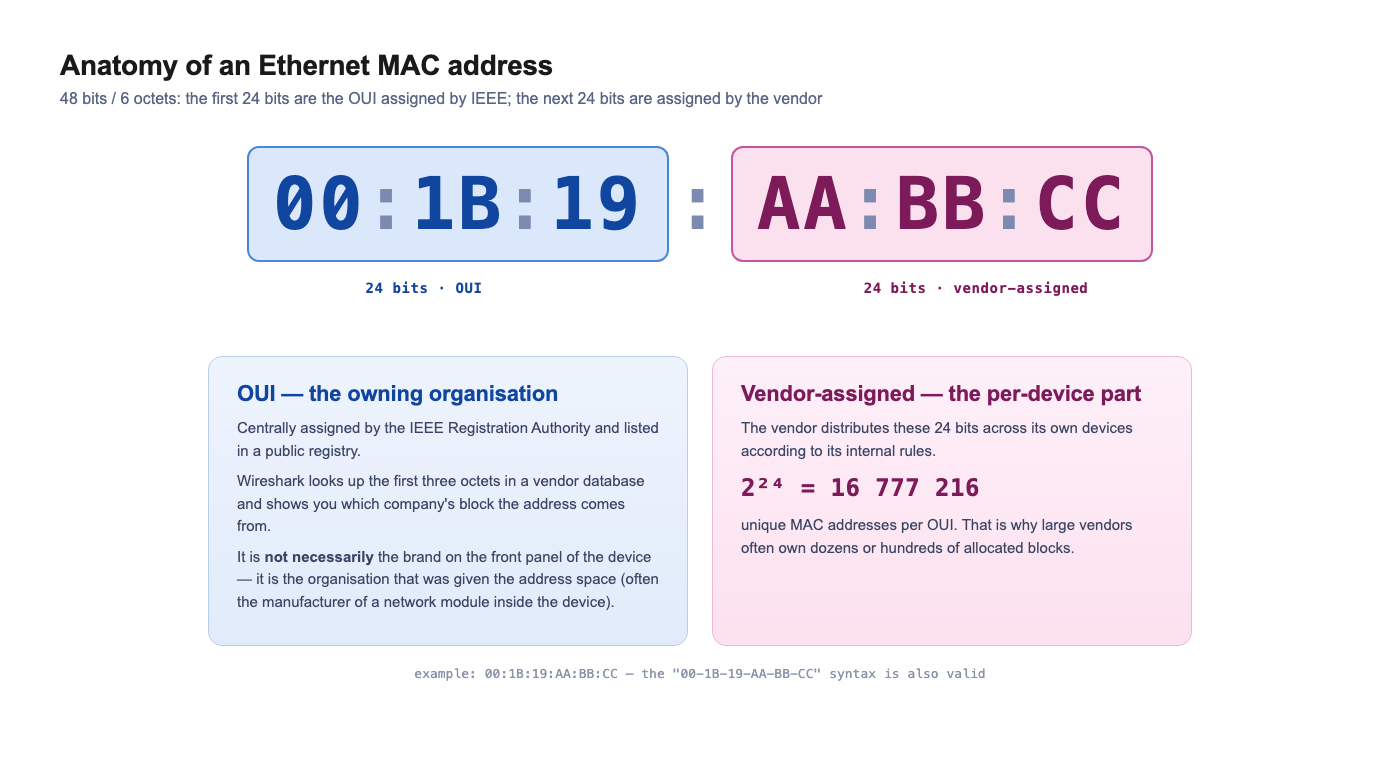
A MAC address of an Ethernet interface is normally 48 bits, that is 6 octets. One octet is 8 bits. In the familiar form a MAC address is written as six pairs of hex characters:
00:1B:19:AA:BB:CC
or like this:
00-1B-19-AA-BB-CC
Such an address can be split conceptually into two parts:
00:1B:19:AA:BB:CC
│──────│ │──────│
  OUI    individual part of the address
The first three octets, i.e. the first 24 bits, are the OUI: Organizationally Unique Identifier. The remaining three octets — another 24 bits — are used by the organisation to assign unique addresses to specific network interfaces.
What an OUI is
The OUI is a unique identifier of an organisation, assigned through the IEEE Registration Authority.
A common shorthand is: the OUI is the first three octets of a MAC address, from which you can identify the vendor of a device.
For practical traffic analysis that explanation is usually convenient. Formally it is more accurate to say:
The OUI identifies the organisation to which IEEE has allocated the corresponding address space.
That organisation may be a manufacturer of a network card, an industrial switch, an IED, a controller, a communication module, an embedded board, server hardware, or a virtualisation platform.
So the OUI does not always unambiguously point to the brand printed on the front panel. Sometimes it identifies the manufacturer of the network interface, module, or chip installed inside the equipment.
How an OUI becomes a MAC address
When an organisation is assigned an OUI, it can use the remaining 24 bits to form unique MAC addresses.
For example, if an organisation has been allocated the OUI:
00:1B:19
then it can assign its devices addresses of the form:
00:1B:19:00:00:01
00:1B:19:00:00:02
00:1B:19:00:00:03
...
00:1B:19:FF:FF:FF
The remaining 24 bits give:
2^24 = 16 777 216
That is, one large block lets the vendor form about 16.7 million unique 48-bit addresses.
That is exactly why large manufacturers of network equipment, server boards, industrial devices, Wi-Fi modules and Ethernet controllers may own not one but dozens or hundreds of allocated blocks.
How an organisation obtains an OUI
The OUI is not chosen by the manufacturer itself. It is assigned by the IEEE Registration Authority — the IEEE registration body that maintains the global identifier registries.
The process can be described as a few steps.
The company decides which address block it needs
If an organisation produces devices with Ethernet interfaces, it needs unique MAC addresses.
This could be a manufacturer of:
- IEDs;
- industrial switches;
- controllers;
- gateways;
- servers;
- communication boards;
- embedded modules;
- test equipment;
- devices for SCADA and protection;
- and so on.
Depending on the production scale, the company chooses an appropriate IEEE registration block: large, medium, or small.
The classic case most often associated with the term OUI is MA-L, or MAC Address Block Large.
The organisation applies to the IEEE Registration Authority
The company applies through the IEEE RA. The application contains information about the organisation, contact details, the type of block required, and the publication format for the information.
The data may be public or confidential. If the registration is public, the information about the organisation enters the open databases that are then used by OUI lookup tools, including Wireshark and other vendor databases.
IEEE reviews the application
IEEE reviews the application and assigns an address block to the organisation.
Importantly, IEEE does not assign each MAC address individually. It allocates a range to the organisation, and the organisation then distributes specific addresses among its devices.
That is, the manufacturer obtains the right to use a certain address block, and then assigns individual MAC addresses to specific network interfaces within its own production system.
To obtain an additional OUI, the organisation must confirm that it will not start using a new block in its products until at least 95% of the previous block has been used in the relevant standard. This rule exists so that large address spaces do not remain unused.
The data is published in the registry
If the registration is public, the information about the block becomes available in the IEEE registration databases and in derivative vendor databases.
This is exactly why Wireshark can show not only the MAC address but also the name of the organisation that owns the corresponding range.
For example, instead of a fully "bare" address the engineer can see a more meaningful representation with the vendor or organisation indicated.
What IEEE registration blocks exist
It is important to understand that the OUI is not the only kind of IEEE registration block. There are different variants for different production scales and different identification tasks.
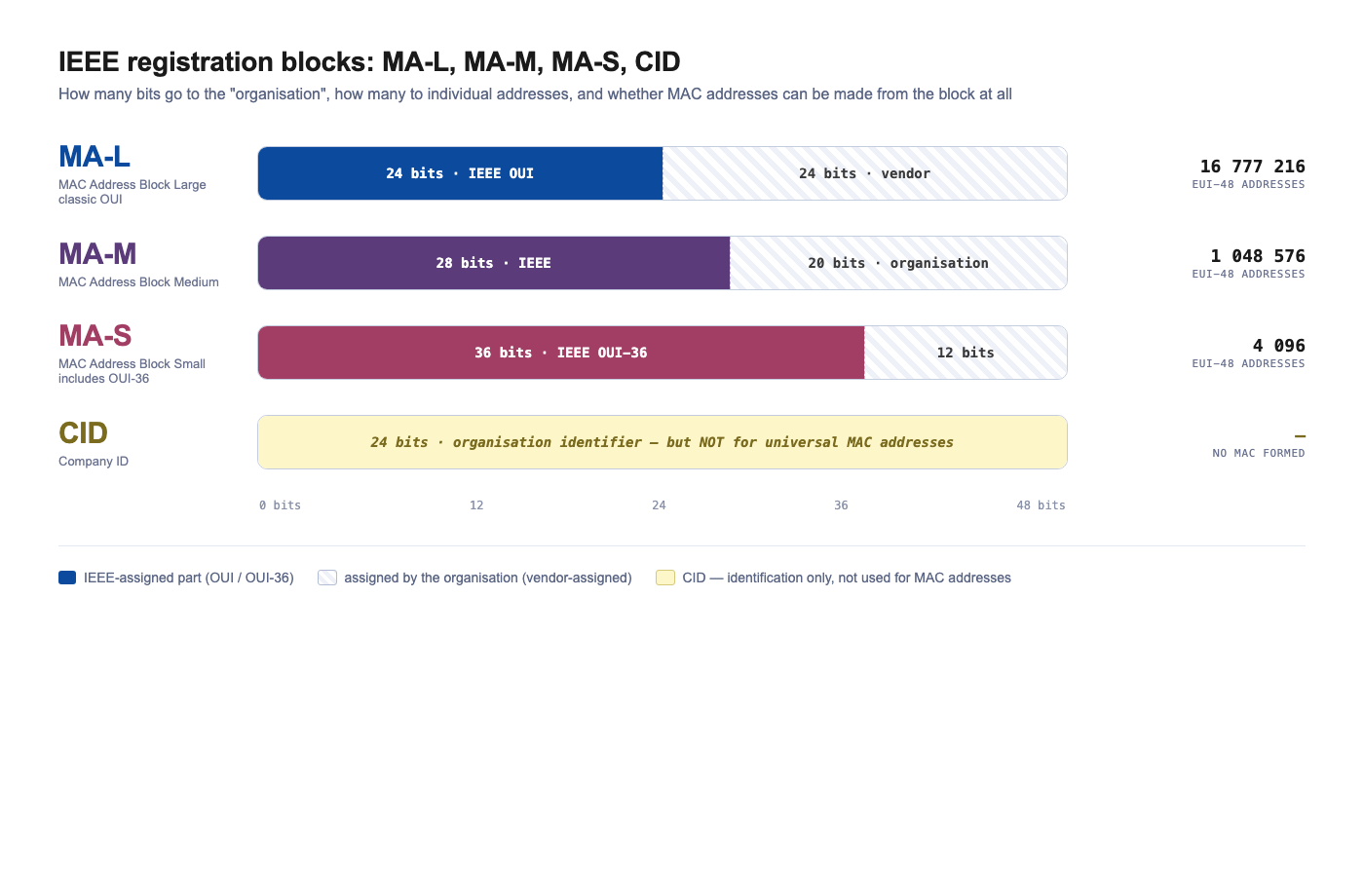
In terms of MAC addresses, it is helpful to distinguish four concepts:
MA-L — large MAC address block, includes an OUI
MA-M — medium MAC address block
MA-S — small MAC address block, includes an OUI-36
CID  — Company ID, but not for forming universal MAC addresses
MA-L — the large block, the classic OUI case
MA-L stands for MAC Address Block Large.
This is the variant most often referred to in practical literature as "getting an OUI".
With an MA-L the organisation receives a 24-bit OUI and can form 48-bit EUI-48 identifiers on its basis, which are used as MAC addresses on Ethernet interfaces.
The EUI-48 structure looks like this:
OUI assigned by IEEE:           24 bits
Vendor-assigned portion:        24 bits
Total EUI-48 / MAC:             48 bits
Example:
00:1B:19:AA:BB:CC
│──────│ │──────│
  OUI    vendor-assigned part
One MA-L block yields:
2^24 = 16 777 216
unique EUI-48 addresses.
This kind of block suits large equipment manufacturers producing big batches of devices with network interfaces.
For an engineer analysing a pcap file in Wireshark, MA-L/OUI is exactly what gives the familiar vendor lookup from the first three octets of a MAC address.
MA-M — the medium block
MA-M stands for MAC Address Block Medium.
It is meant for organisations that do not need the huge MA-L range but need more addresses than a small block can provide.
For EUI-48 it looks like this:
MA-M assigned by IEEE:    28 bits
Organisation portion:     20 bits
Total EUI-48 / MAC:       48 bits
The number of EUI-48 addresses in such a block:
2^20 = 1 048 576
So MA-M provides roughly 1 million 48-bit addresses.
It can be a convenient option for a mid-scale manufacturer who does not need a range of 16.7 million addresses, but does need a large enough address space for serial production.
An important point: MA-M is not a classic OUI in the conventional "first 24 bits" sense. It is therefore not always correct to reduce the whole IEEE registration system to "the first three octets are the manufacturer".
MA-S — the small block and OUI-36
MA-S stands for MAC Address Block Small.
It is meant for organisations that need a comparatively small number of unique addresses.
MA-S is associated with the concept of OUI-36. For EUI-48 it looks like:
MA-S / OUI-36 assigned by IEEE:  36 bits
Organisation portion:            12 bits
Total EUI-48 / MAC:              48 bits
The number of EUI-48 addresses:
2^12 = 4096
That is, MA-S provides only 4096 unique 48-bit addresses.
This option may be enough for small manufacturers, pilot batches of equipment, specialised devices, lab instruments or low-volume industrial solutions.
For a digital substation this can be relevant too. A small company may produce specialised gateways, interface modules, test devices or service equipment for IEC 61850. For such products a huge MA-L block can be excessive, and MA-S is enough.
CID — Company ID
There is also a separate concept, CID, or Company ID.
In size it looks like an OUI: it is also a unique 24-bit identifier of an organisation. But its purpose is different.
The key distinction:
A CID may not be used to form universal MAC addresses EUI-48 or EUI-64.
A CID is intended for cases where an organisation needs a unique identifier but does not need to issue universally unique MAC addresses.
In other words:
A CID can be used as an organisation identifier.
A CID cannot be used as a basis for universal MAC addresses.
If a manufacturer ships a device with an Ethernet interface and wants to assign universally unique MAC addresses to it, it needs not a CID but one of the address blocks MA-L, MA-M or MA-S.
Comparing MA-L, MA-M, MA-S and CID
| Block type | What IEEE issues | Can form EUI-48 / MAC | Number of EUI-48 addresses | Who it suits |
|---|---|---|---|---|
| MA-L | 24-bit OUI | Yes | 16 777 216 | Large equipment manufacturers |
| MA-M | 28-bit block | Yes | 1 048 576 | Mid-scale manufacturers |
| MA-S | 36-bit OUI-36 | Yes | 4096 | Small manufacturers, pilot batches, specialised devices |
| CID | 24-bit Company ID | No | Not applicable | Organisation identification without issuing universal MAC addresses |
In short, IEEE does not hand organisations individual MAC addresses; it hands them address blocks of different sizes. A large manufacturer needs an MA-L, a mid-scale manufacturer may settle for an MA-M, a small company for an MA-S. A CID is for other organisation-identification tasks, not for MAC addresses.
How Wireshark uses the OUI
Wireshark can look up MAC addresses against a vendor database.
When an Ethernet frame appears in a pcap file, Wireshark can look at the first octets of the MAC address and try to find a matching record in the vendor database.
For example, here is a MAC address:
00:30:A7:12:34:56
The OUI is:
00:30:A7
This OUI belongs to Schweitzer Engineering Laboratories.
So already in the first analysis step you can assume that the Ethernet frame was sent by a device, or a network interface, associated with SEL equipment.
For a digital-substation engineer this is a useful hint. If SEL devices are indeed deployed on site, such a Source MAC may be expected. Next, you cross-reference it with project documentation, the SCD file, an IP address, VLAN, a switch port and a specific IED.
For example:
Source MAC:      00:30:A7:12:34:56
OUI:             00:30:A7
Vendor:          Schweitzer Engineering Laboratories
Traffic type:    GOOSE / MMS / operational Ethernet traffic
The analysis logic can look like this:
00:30:A7:12:34:56
        ↓
OUI: Schweitzer Engineering Laboratories
        ↓
check:
- are SEL devices present on site;
- which switch port sees this MAC;
- which IP address maps to this MAC;
- does the device publish GOOSE;
- does it establish an MMS session;
- is there a matching IEDName in the SCD file.
The result must be read carefully though. An OUI lookup shows the owner of an address block, or the organisation associated with the network interface. It does not always mean the end device as a whole is produced by that organisation.
Why an engineer at a digital substation needs the OUI
At a digital substation the Ethernet network is not just supporting IT infrastructure. It carries critical operational data:
- GOOSE messages;
- Sampled Values streams;
- MMS traffic to IEDs;
- PTP time synchronisation;
- operational traffic of switches;
- engineering access;
- SCADA and protection data.
So understanding who is on the network has direct operational value.
The OUI can help with several practical tasks.
Quickly understand the equipment composition in a pcap file
Imagine an engineer has received a pcap file from a digital substation. It contains dozens or hundreds of MAC addresses. Some belong to IEDs, some to switches, some to servers, some to engineering workstations.
Without any extra lookup it looks like a list of addresses:
00:30:A7:12:34:56
00:1B:19:AA:BB:CC
00:80:63:11:22:33
E8:9F:80:77:88:99
After an OUI lookup the engineer can see that different addresses belong to different vendors of network interfaces or equipment.
For example:
| Source MAC | OUI | What can be assumed |
|---|---|---|
00:30:A7:12:34:56 |
00:30:A7 |
Device or network interface associated with Schweitzer Engineering Laboratories |
00:1B:19:AA:BB:CC |
00:1B:19 |
Requires a check against the OUI database |
00:80:63:11:22:33 |
00:80:63 |
Requires a check against the OUI database |
E8:9F:80:77:88:99 |
E8:9F:80 |
Requires a check against the OUI database |
On a real substation that helps quickly raise the right questions:
- why is this address present in the technology network;
- does it match the expected equipment composition;
- is this participant in the LAN diagram, the SCD file and the connection table;
- which switch port is this Source MAC arriving on;
- what traffic does it carry: GOOSE, SV, MMS, PTP, ARP, operational protocols.
For example, if SEL devices are indeed used at the substation, a Source MAC with OUI 00:30:A7 may be expected. But if SEL devices are not deployed on site, this is a reason to investigate where the MAC address came from and what hardware is actually connected.
Find an unexpected device in the technology network
If only specific devices are supposed to be in the technology network, an unexpected OUI may be a reason to check.
For example, the network should contain:
- protection IEDs;
- bay controllers;
- industrial switches;
- SCADA servers;
- IEC 61850 online monitoring system servers;
- engineering workstations;
- time synchronisation equipment.
And the pcap file suddenly contains a MAC address whose OUI belongs to a consumer router vendor, an office access point, a camera, or a USB Ethernet adapter.
That does not prove a violation by itself. There can be different explanations:
- an engineer's laptop was temporarily connected;
- a USB Ethernet adapter was in use;
- a service router was plugged in;
- testing was being carried out;
- the contractor used some temporary equipment;
- a virtual machine was assigned a MAC;
- the device was connected by mistake.
But it is a reason to raise the right questions:
- what is this device;
- who plugged it in;
- to which switch port it was connected;
- was it listed in the project documentation;
- did it participate in the operational exchange;
- could it have affected GOOSE, SV, MMS or PTP.
Compare the actual network with the project documentation
The project documentation, SCD files, LAN diagrams and port tables normally state which devices are supposed to be on the network.
But on a live site the actual picture can differ from the project.
For example:
- a switch was replaced;
- a different equipment revision was installed;
- a temporary device was added;
- an engineering workstation was connected;
- the mirroring scheme was changed;
- a network module was swapped inside a device;
- part of the equipment was modernised without being reflected in the documentation.
An OUI lookup helps to quickly see whether the actual composition of network participants matches the expected one.
The OUI does not replace a full check, of course. But it can be a good first indicator of a mismatch.
Speed up troubleshooting of GOOSE, SV and MMS problems
When investigating a non-standard situation, it matters to quickly understand who is taking part in the exchange.
For example:
- which device publishes a particular GOOSE;
- where Sampled Values come from;
- who establishes a particular MMS session;
- which MAC belongs to the SCADA server;
- which address belongs to the engineering workstation;
- which device sends an unexpected broadcast or multicast;
- who generates spurious operational traffic.
The OUI helps you orient yourself among Ethernet addresses faster.
This is especially useful when the pcap file lacks full contextual information and the engineer is analysing the capture after the event — for example, when investigating an incident, verifying commissioning, analysing the operation of an IEC 61850 online monitoring system, or troubleshooting issues on a running digital substation.
Check network hygiene of the site
The technology network of a digital substation should not contain random devices.
An OUI lookup can be part of a basic network-hygiene check:
- which network-interface vendors are visible in the technology network;
- are there any unexpected consumer or office devices;
- are there virtual network interfaces;
- are there signs of temporary equipment;
- does the actual device composition match the expected one;
- are there devices unrelated to protection, SCADA or the network infrastructure.
This is especially relevant for networks carrying GOOSE and Sampled Values. Such networks should be predictable, manageable and well documented.
Duplicate Source MAC on a real site: can it happen
A separate important question: can identical source MAC addresses appear on a real site?
Yes, they can. But for a normal Ethernet network this is an abnormal situation.
It matters to talk specifically about the Source MAC, that is, the source MAC address of an Ethernet frame. This is the address of the device that sent the frame.
Source MAC = who the frame came from
In a normal situation, two different devices in the same VLAN should not be sending frames with the same Source MAC at the same time.
If they do, the switch will struggle to figure out where the device with that MAC really is.
How a switch uses the Source MAC
An Ethernet switch builds its forwarding table based on source MAC addresses.
It works roughly like this:
- A frame arrives on a port.
- The switch looks at the Source MAC field.
- It remembers: this MAC address is behind that port.
- When it later needs to forward a frame to that MAC, it sends it to the corresponding port.
For example:
Port 3 → frame received with Source MAC 00:30:A7:12:34:56
The switch records:
00:30:A7:12:34:56 → port 3
Now, if the SCADA server, the engineering workstation or another IED sends unicast traffic to that MAC address, the switch forwards the frame to port 3.
What happens with a Source MAC conflict
Imagine the site has two devices:
IED-1 connected to port 3
IED-2 connected to port 8
But they share the same MAC address:
00:30:A7:12:34:56
First IED-1 sends a frame:
Source MAC: 00:30:A7:12:34:56
Port:       3
The switch records:
00:30:A7:12:34:56 → port 3
Then IED-2 sends a frame:
Source MAC: 00:30:A7:12:34:56
Port:       8
The switch overwrites the entry:
00:30:A7:12:34:56 → port 8
Then a frame from IED-1 arrives again — and the entry changes again:
00:30:A7:12:34:56 → port 3
This effect is often called MAC flapping: the same MAC address "hops" between ports.
sequenceDiagram
    autonumber
    participant I1 as IED-1<br/>(port 3)
    participant SW as Switch
    participant I2 as IED-2<br/>(port 8)

    Note over I1,I2: both send frames with the same Source MAC<br/>00:30:A7:12:34:56

    I1->>SW: frame, Source MAC = 00:30:A7:12:34:56
    Note right of SW: learns:<br/>MAC → port 3

    I2->>SW: frame, Source MAC = 00:30:A7:12:34:56
    Note right of SW: overwrites:<br/>MAC → port 8

    I1->>SW: frame, Source MAC = 00:30:A7:12:34:56
    Note right of SW: again:<br/>MAC → port 3

    I2->>SW: frame, Source MAC = 00:30:A7:12:34:56
    Note right of SW: again:<br/>MAC → port 8

    Note over I1,I2: ⚠️ MAC flapping —<br/>unicast traffic goes now to port 3, now to port 8
Why duplicate Source MACs are dangerous
The main issue is that the switch becomes unstable about where to send traffic for that MAC.
For example, the SCADA server sends an MMS request to a device with MAC:
00:30:A7:12:34:56
But at that moment the switch's table reads:
00:30:A7:12:34:56 → port 8
So the frame goes to port 8. A second later the table relearns to port 3 — and the next frame goes there.
The results can be:
- unstable MMS sessions;
- intermittent loss of connectivity;
- "floating" diagnostic errors;
- strange TCP-session drops;
- errors in switch logs;
- wrong port-to-device binding;
- pcap analysis becomes harder;
- a false feeling that "it works, then it doesn't".
For a digital substation this is particularly unpleasant, because such problems may look like an IED malfunction, an MMS configuration error, a VLAN issue, a switch fault, or server instability. The real cause sits one layer below — in conflicting Source MACs.
Where duplicate Source MACs come from on a real site
There are several realistic scenarios.
Cloning of virtual machines
This is one of the most common practical scenarios.
For example, a SCADA server, an IEC 61850 online monitoring system server, an engineering workstation or a test rig is running in virtualisation. The VM was cloned but the MAC address of the network adapter was not changed.
As a result, two virtual machines may end up in the same VLAN with the same Source MAC.
This is particularly likely during rapid commissioning, image migration, deployment of standby servers or creation of stand copies.
Manual MAC configuration
In some operating systems, hypervisors, gateways, controllers and network devices the MAC address can be set manually.
It may be done for testing, redundancy, migration, licence-binding workarounds, or by mistake. If such an address collides with an existing device, a conflict appears.
Copying a device configuration
During commissioning it is sometimes common to copy a configuration from one device to another.
If the configuration contains the MAC address or network-interface parameters, the same address can accidentally be moved to two devices.
For most IEDs the factory MAC is hard-coded, but for gateways, industrial controllers, servers, virtual machines and some embedded devices the risk is more realistic.
Redundancy with a virtual MAC
Some redundancy schemes use a shared virtual MAC address.
The idea is that the network sees one "virtual" node, while two devices — primary and standby — physically serve it. Only one of them should be active at a time.
If both nodes mistakenly become active, you get a conflict and MAC flapping.
For a digital substation this may be relevant for servers, gateways, routers, firewalls, SCADA clusters or higher-level systems. For two independent protection IEDs this is not a normal scenario.
Manufacturer error or a pilot batch
Rare but theoretically possible: hardware shipped with non-unique MAC addresses.
This is uncommon for serial products, but can show up in low-volume devices, pre-production samples, test-bench equipment or in case of a faulty firmware build.
Locally administered MAC addresses
If a MAC address is not factory-assigned but locally administered, its uniqueness no longer depends on IEEE and the manufacturer but on whoever set it.
So in stands, virtualisation, temporary commissioning setups and experimental configurations the risk of duplicates is higher.
How to detect duplicate Source MACs in Wireshark
In a pcap, a sign of conflict can be a situation where the same Source MAC is associated with different entities:
one Source MAC → different IP addresses
one Source MAC → different MMS sessions
one Source MAC → different svID values
For example, in one segment of traffic you see:
Source MAC: 00:30:A7:12:34:56
IP:         10.10.1.21
IEDName:    SEL_IED_Q01
And in another segment of the same capture:
Source MAC: 00:30:A7:12:34:56
IP:         10.10.1.22
IEDName:    SEL_IED_Q02
This is a strong indicator that a MAC conflict, or a particular redundancy behaviour, needs to be checked.
For GOOSE you can look not only at the Source MAC but also at the IEC 61850 fields:
Source MAC the same,
but GoCBRef/goID differ
For SV:
Source MAC the same,
but svID values differ
For MMS:
Source MAC the same,
but IP addresses or MMS sessions differ
Such a picture does not automatically mean a fault, but it does call for a check.
How to detect a conflict on the switch
On the switch you need to look at the MAC table and the event logs.
A typical symptom:
00:30:A7:12:34:56 → port 3
a few seconds later:
00:30:A7:12:34:56 → port 8
then again:
00:30:A7:12:34:56 → port 3
In the logs it may be called differently:
MAC flapping
MAC address moved
Duplicate MAC address
MAC move detected
The exact wording depends on the switch vendor.
If an IEC 61850 online monitoring system (such as Tekvel Park) is deployed on site, such behaviour can also be visible as a moving MAC address, the appearance of an unknown device, a change in the traffic source, or a deviation from the expected exchange pattern.
What to do when you find a duplicate Source MAC
A practical order of actions:
- Make sure you are really dealing with a duplicate Source MAC.
- Check which switch ports this MAC is arriving on.
- Identify the physical devices connected to those ports.
- Check whether there is a legitimate redundancy mechanism using a virtual MAC.
- If there is no redundancy — look for a configuration error.
- Check virtual machines, cloned images, gateways, servers and engineering workstations.
- Check whether the MAC has been set manually.
- Check whether a device configuration has been copied.
- Fix the addressing or the configuration.
- After the fix, recheck the MAC table and a fresh pcap.
The main thing is not to try to cure only the upper layer. With a Source MAC conflict you can spend a long time chasing the error in MMS, IED settings, VLANs or server software, while the cause is that the switch cannot stably tell which port the MAC really sits behind.
A practical example for a digital substation
An engineer analyses a pcap file from a digital substation. The capture contains MMS traffic between the SCADA server and several IEDs. The MMS session with one device periodically drops and then recovers.
At first glance one could suspect:
- network issues;
- MMS configuration errors;
- IED overload;
- server issues;
- VLAN errors;
- switch instability.
But at the Ethernet level it turns out that the same Source MAC appears in frames with different IP addresses.
For example:
Frames from the first device:
Source MAC: 00:30:A7:12:34:56
IP:         10.10.1.21
IEDName:    SEL_IED_Q01
and:
Frames from the second device:
Source MAC: 00:30:A7:12:34:56
IP:         10.10.1.22
IEDName:    SEL_IED_Q02
Next, the engineer looks at the switch MAC table and sees:
00:30:A7:12:34:56 → port 5
00:30:A7:12:34:56 → port 12
00:30:A7:12:34:56 → port 5
00:30:A7:12:34:56 → port 12
That is, the same MAC keeps "moving" between two ports.
After inspection it turns out that one of the devices was replaced or misconfigured, or that a copy of a configuration / virtual machine with the same MAC was used on site.
After fixing the MAC, the connectivity becomes stable and the MAC flapping events on the switch disappear.
This example shows clearly why digital-substation analysis should look not only at IEC 61850 but also at the basic Ethernet mechanisms.
Important caveat: the OUI is not absolute proof
The OUI is useful but cannot be treated as conclusive proof of where a device comes from.
There are several reasons.
A MAC address may be locally administered
There are two kinds of MAC addresses:
UAA — Universally Administered Address
LAA — Locally Administered Address
UAA — a universally administered address. Normally this is the factory MAC, allocated by the manufacturer from its address range.
LAA — a locally administered address. It can be assigned by the operating system, the hypervisor, the network administrator or by software.
Locally administered MAC addresses are common in virtual machines, containers, test rigs and engineering environments.
A MAC address may be changed in software
In many operating systems the MAC address of a network interface can be changed programmatically.
This can be used for testing, virtualisation, redundancy, VM migration, or with specialised software.
So the mere fact that the OUI points to a particular organisation does not guarantee that the physical device is actually produced by that organisation.
The OUI may belong to a network module, not the end device
In industrial equipment, ready-made Ethernet modules, chips, boards and communication processors are often used.
So in a pcap the OUI may identify not the manufacturer of the IED but the manufacturer of the network controller or embedded board inside it.
For example, the front-panel brand of the device is one thing, and the OUI of its MAC belongs to the vendor of the network chip or embedded board inside.
Database information may be incomplete
Lookup tools rely on vendor databases that are updated over time.
If the local Wireshark database is outdated, a new address block may be shown incorrectly or not at all.
Also, some registration data may be confidential.
How to use OUI and Source MAC correctly when analysing a digital substation
The right approach is:
The OUI is a useful diagnostic signal, and the Source MAC is an important sender identifier. But final conclusions should only be drawn after cross-checking several sources of data.
When analysing a digital substation it pays to cross-reference:
- the SCD file;
- the network diagram;
- switch forwarding tables;
- VLAN settings;
- LLDP;
- IP addresses;
- ARP tables;
- IED settings;
- event logs;
- switch ports;
- pcap files;
- data from an IEC 61850 online monitoring system (such as Tekvel Park).
Only against this combination of inputs can a sound conclusion be made about what device is on the network, where its traffic comes from, and whether the actual picture matches the project.
A mini checklist for the engineer when analysing a pcap
For a first pass over digital-substation traffic, a few simple steps go a long way.
flowchart TB
    START["<b>Source MAC in the pcap</b><br/>e.g. 00:30:A7:12:34:56"]
    Q1{"OUI matches the<br/>expected equipment<br/>on site?"}
    Q2{"Source MAC unique<br/>within its VLAN?"}
    Q3{"Frames arrive from<br/>a single switch port?"}

    INV["<b>Investigate origin</b><br/>• what is this device?<br/>• how did it reach the network?<br/>• is it in the SCD / LAN diagram?<br/>• what traffic does it carry?"]
    FLAP["<b>MAC flapping</b><br/>• switch forwarding table<br/>• logs (MAC moved / duplicate)<br/>• IEC 61850 online monitoring system<br/>(e.g. Tekvel Park)"]
    SRC["<b>Find the duplicate source</b><br/>• cloned virtual machine<br/>• manual MAC configuration<br/>• copied device configuration<br/>• virtual MAC of a redundancy scheme"]
    OK["<b>OK</b><br/>cross-check with SCD,<br/>project documentation,<br/>ports and VLANs"]

    START --> Q1
    Q1 -- "yes" --> Q2
    Q1 -- "no / unknown" --> INV
    INV --> Q2
    Q2 -- "yes, unique" --> Q3
    Q2 -- "no, duplicate" --> FLAP
    Q3 -- "yes" --> OK
    Q3 -- "no, from several" --> FLAP
    FLAP --> SRC

    style START fill:#E0F2F1,stroke:#26A69A,color:#004D40
    style Q1 fill:#FFF8E1,stroke:#E6A23C,color:#7A5418
    style Q2 fill:#FFF8E1,stroke:#E6A23C,color:#7A5418
    style Q3 fill:#FFF8E1,stroke:#E6A23C,color:#7A5418
    style INV fill:#E3F2FD,stroke:#42A5F5,color:#0D47A1
    style FLAP fill:#FDE8E8,stroke:#F56C6C,color:#B71C1C
    style SRC fill:#FBE9E7,stroke:#E64A19,color:#BF360C
    style OK fill:#E8F5E9,stroke:#67C23A,color:#1B5E20
List the Source MACs
Extract every unique source MAC address that appears in the pcap.
Look up the OUIs
See which organisations own the first octets of those addresses.
Find devices you wouldn't expect to see in the site's setup
Compare the OUIs you found with the expected equipment composition on site.
For example, if SEL devices are used on site, OUI 00:30:A7 may be expected. If no SEL devices are deployed, that MAC needs an extra check.
Check Source MAC uniqueness
Make sure a single Source MAC is not used by different IP addresses, MMS sessions, IEDName values, GoCBRef or svID values.
Check the switch MAC table
If the same MAC appears on different ports, check for possible MAC flapping.
Map to VLANs and traffic types
It is important to understand not only the vendor but also what the device does on the network:
- publishes GOOSE;
- transmits Sampled Values;
- establishes an MMS connection;
- participates in PTP;
- sends ARP;
- generates broadcasts;
- carries operational traffic.
Cross-reference with the documentation
The results should be compared with the SCD file, the LAN diagram, the connection tables, the switch configurations and the actual site setup.
What is especially important for a digital substation
At a classic substation an engineer often sees the chain physically: cable, terminals, cabinet, device, discrete signal.
At a digital substation a significant part of the interactions is shifted into the Ethernet network. Protection signals, measurements, commands, interlocks and telecontrol are transmitted as messages.
So operations must be able to read not only secondary-circuit diagrams but also network traces.
The OUI and the Source MAC are simple but valuable elements of that analysis.
The OUI helps answer the question:
who owns this address block?
The Source MAC helps answer the question:
who is sending frames into the network?
And looking at the Source MAC over time helps to answer:
is there an address conflict, MAC flapping, or a redundancy misbehaviour?
For a digital substation this matters especially, because one conflicting MAC can present as an unstable MMS connection, odd server behaviour, diagnostic errors, GOOSE/SV analysis difficulties, or unpredictable network behaviour.
Takeaway
The OUI is the first octets of a MAC address, from which you can often identify the organisation that owns the address block. For a digital-substation engineer this is a convenient first-line diagnostic tool: it helps to see which devices are present in the technology network, find unexpected connections, and reconcile real traffic with project documentation.
For example, Source MAC 00:30:A7:12:34:56 contains the OUI 00:30:A7, which belongs to Schweitzer Engineering Laboratories. If SEL devices are deployed on site, this is an expected signal. If not — the address becomes a reason to verify the actual connection and equipment.
But the OUI must not be treated as absolute proof. A MAC address may be locally administered, changed in software, refer to a network module rather than the end device, or simply be missing from the local lookup database.
The uniqueness of the Source MAC is a separate concern. If two different devices in the same VLAN send frames with the same Source MAC, the switch will keep relearning its forwarding table. MAC flapping appears, unicast traffic can be misrouted, MMS sessions become unstable, and troubleshooting turns into chasing a "floating" error.
So when analysing a digital substation it pays to look not only at IEC 61850, IP addresses and VLANs, but also at the basic Ethernet layer: Source MAC, OUI, switch forwarding tables and MAC behaviour over time.
In digital-substation operations, the ability to read these network signs is becoming as important as the ability to read secondary-circuit diagrams. Because at a digital substation a sizable part of the "wiring" already lives inside the Ethernet network.