In digital-substation projects, a lot of attention usually goes to GOOSE, SV, PTP and the network infrastructure. That is understandable: GOOSE and SV are extremely critical communications — sensitive to delays, packet loss and the quality of the network infrastructure, while time synchronisation directly affects the trustworthiness of measurements and events.
But there is another important layer, without which a digital substation does not become a full-fledged automation system — MMS exchange and, in particular, IEC 61850 reports. It is through reports that SCADA, the SCADA/automation system, HMI, gateways and monitoring systems receive telemetry — telesignalling and telemetering — from intelligent electronic devices (IEDs).
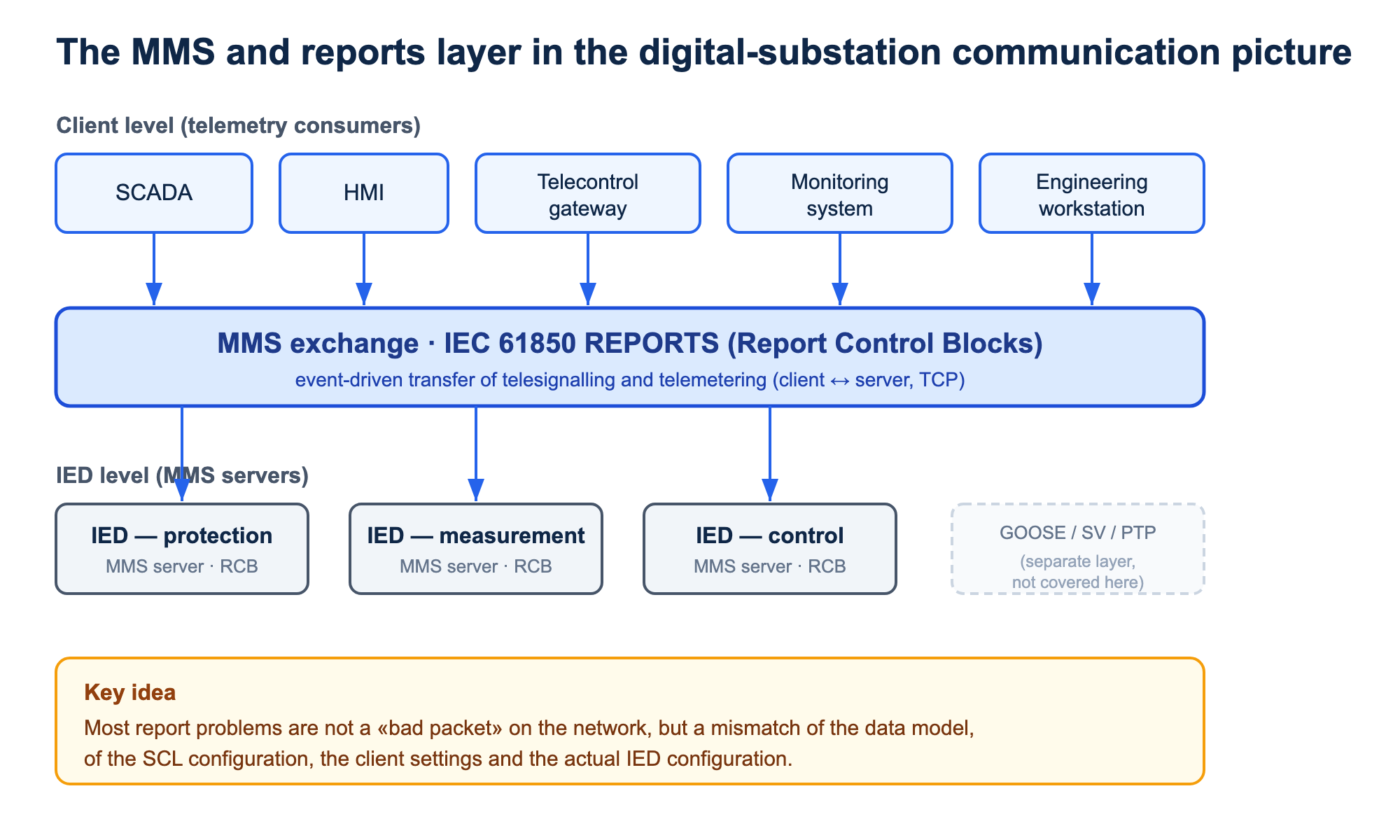
In practice, problems with IEC 61850 reports often look deceptively simple: the MMS connection is up, the device is reachable, the client «sees» the server, yet the data does not update, some signals disappear, events are duplicated, or the report control block does not activate at all. The cause is almost always not a single «bad packet», but a mismatch between the data model, the SCL configuration, the client settings and the actual IED configuration.
Below are the sharpest problems encountered when working with report control blocks in IEC 61850.
The MMS connection is up, but the report control block is not activated
One of the most common situations: the client successfully establishes an MMS connection with the IED, but no report data arrives. At the network level everything looks fine: IP reachability is there, the TCP session is established, the MMS connection is active.
The first thing to check is the state of the RptEna attribute of the relevant report control block.
RptEna = true means the report control block is enabled by the client and should be transmitting data according to its configuration.
RptEna = false means the report control block is not enabled, so no data is transmitted through it.
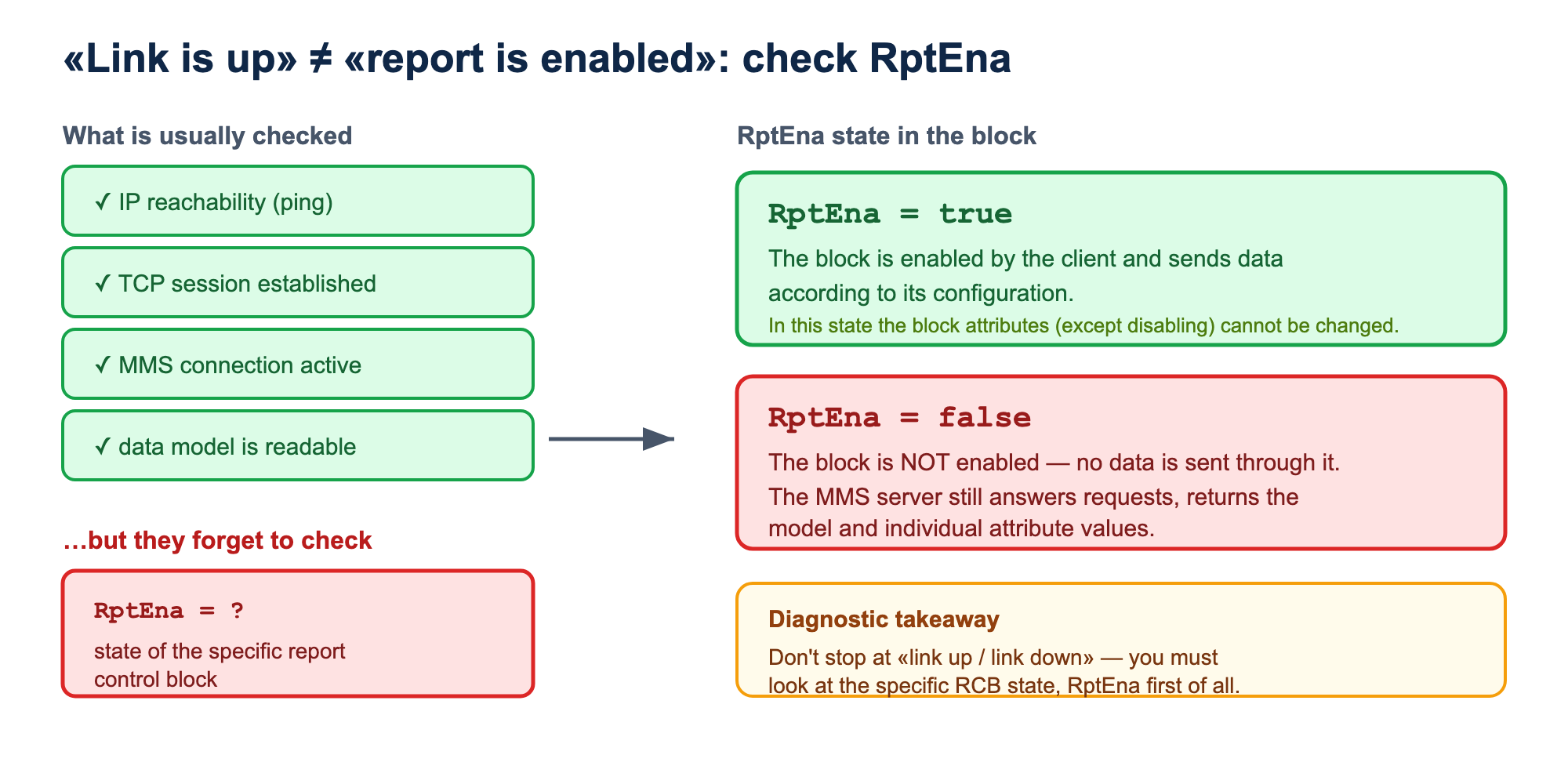
The catch is that a successful MMS connection by itself does not mean the reports have started working. The MMS server can answer requests, allow reading the data model and return individual attribute values — while the report control block stays inactive.
Practical takeaway: when diagnosing, you cannot stop at a «link up / link down» check. You have to check the state of the specific report control block, first of all the RptEna attribute.
ConfRev mismatch: the client refuses to enable the report
ConfRev is a configuration-revision counter. Per IEC 61850-7-2 (ed.2.0, §17.2.2.7 for buffered blocks and similarly for unbuffered ones), it reflects the number of changes of the data set (DataSet) that the report control block references via the DatSet attribute.
The standard explicitly lists which changes increment ConfRev:
- deleting a data-set member;
- adding a data-set member;
- reordering data-set members;
- changing the value of the
DatSetattribute (switching the block to a different data set).
Here is a detail that is often misunderstood: ConfRev does not change when other parameters of the report control block itself change — TrgOps, BufTm, IntgPd, OptFlds, RptID and others. In other words, editing the triggers, the buffer time or the integrity period does not, by itself, increase ConfRev. This revision is «bound» specifically to the composition and order of the data set, not to the report-transfer settings as a whole.
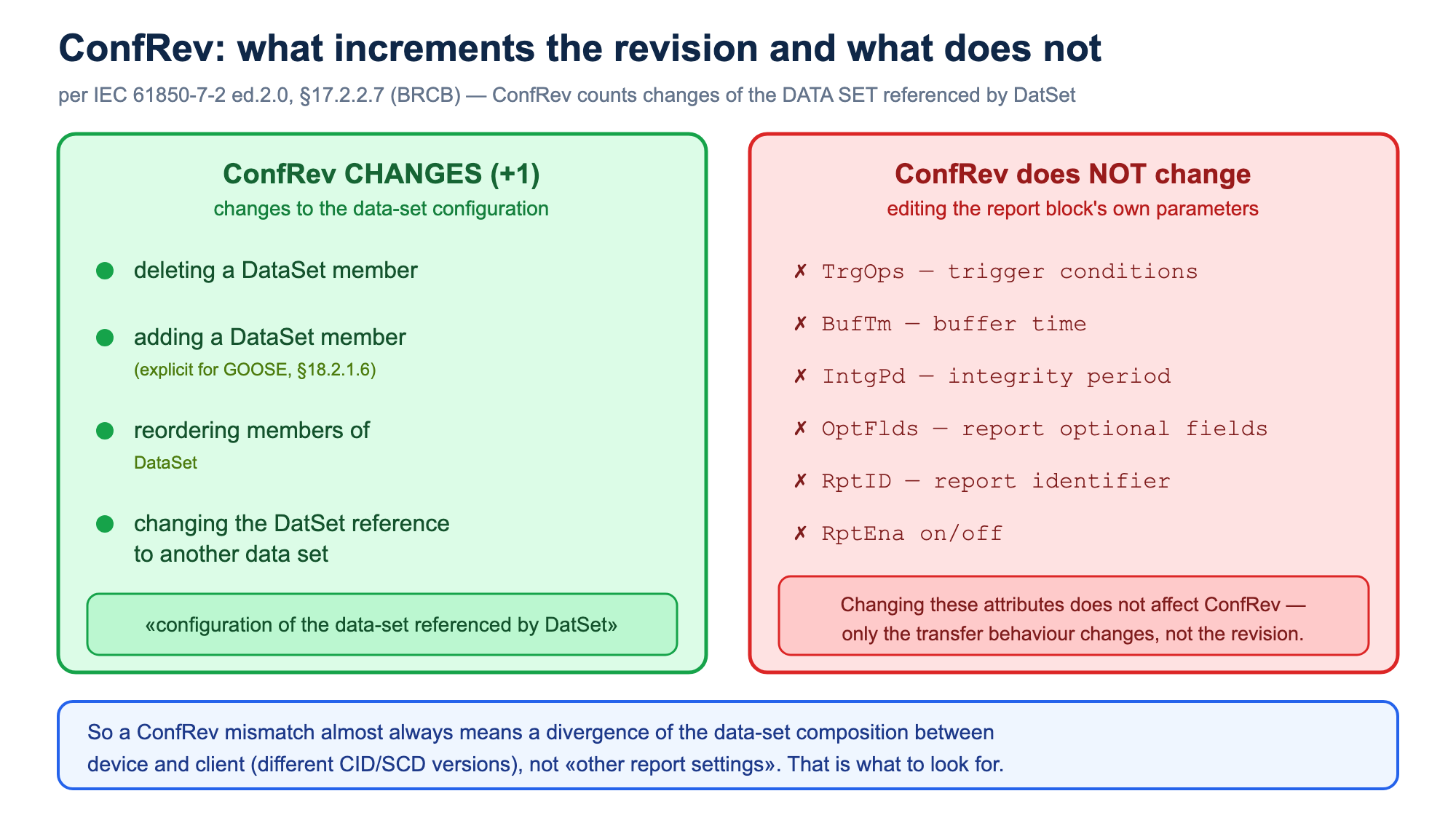
Many IEC 61850 clients read ConfRev from the server's active model on connection and compare it with the value they expect based on the SCL/CID file. If the values do not match, the client may refuse to activate the report control block.
In practice, a ConfRev mismatch almost always indicates that the data-set composition in the device and in the client configuration has diverged. Typical causes:
- the DataSet composition was changed;
- a signal was added or removed;
- data-set members were reordered;
- the report control block was switched to a different DataSet;
- the CID file was rebuilt with an updated data set;
- a new configuration was loaded into the device;
- the SCADA project was updated but not synchronised with the actual IED configuration.
As a result, a paradoxical situation can arise on site: in the project documentation and the SCL file everything looks correct, but the client does not enable the report because the actual ConfRev in the device differs.
It is especially dangerous when different project participants work with different versions of the SCL files: the commissioning engineer uses one CID version, the SCADA developer another, the device manufacturer loaded a third, and a fourth sits in the project archive.
Practical takeaway: when reports misbehave, you should compare not only the SCL file that is «supposed» to be in the device, but the actual model the server returns over MMS. An MMS browser or PCAP analysis is useful here. And since ConfRev tracks the data set specifically, on a revision mismatch you should look first of all for the difference in the composition, order and element types of the DataSet.
A report control block is already taken by another client
On a digital substation, a single IED often serves several clients: SCADA, HMI, telecontrol gateway, monitoring system, engineering workstation, event recorder and others. They may all want to receive the same data set.
But a single instance of a report control block cannot be enabled by several clients at once. If one client has already enabled a specific report control block, a second client trying to enable it will be refused and simply will not be able to activate the report.
A sign of the problem is RptEna already set to true even though «our» client has not yet enabled this report.
Then the practical difficulty begins: the server does not always show which client has taken the report control block (via the Owner attribute). Sometimes this can be seen in the IED diagnostics, sometimes only from the network traffic, by analysing the IP addresses of the clients that read and write the report control block attributes.
IEC 61850 provides an indexing mechanism for the Report Control Block. For example, instead of a single BRep01 the server may support instances BRep0101, BRep0102 and so on. This lets several clients work with different instances of one logical report control block.
But in practice the support for indexing depends on the specific device and client. Moreover, if the client itself «hunts for a free index», this can lead to unexpected behaviour on restarts, link loss and reconnection.
Practical takeaway: for critical systems it is better not to rely on automatically finding a free report control block, but to assign each client its own specific instance in advance. This should be reflected in the configuration, the SCL files and the SCADA/HMI/gateway settings.
The report control block is enabled, but no events arrive
Another common problem: RptEna = true, the report control block is activated, but no data arrives when signals change. Sometimes the client receives data only periodically, sometimes only after a General Interrogation, sometimes nothing at all.
Here you need to look at TrgOps — Trigger Options.
This is exactly the parameter that defines the reasons for which the server must generate a report. IEC 61850 uses the following main options:
data-change— transfer on a value change;quality-change— transfer on a quality change;data-update— transfer on a data update;integrity— periodic transfer of the full state;general-interrogation— transfer on a general-interrogation request.
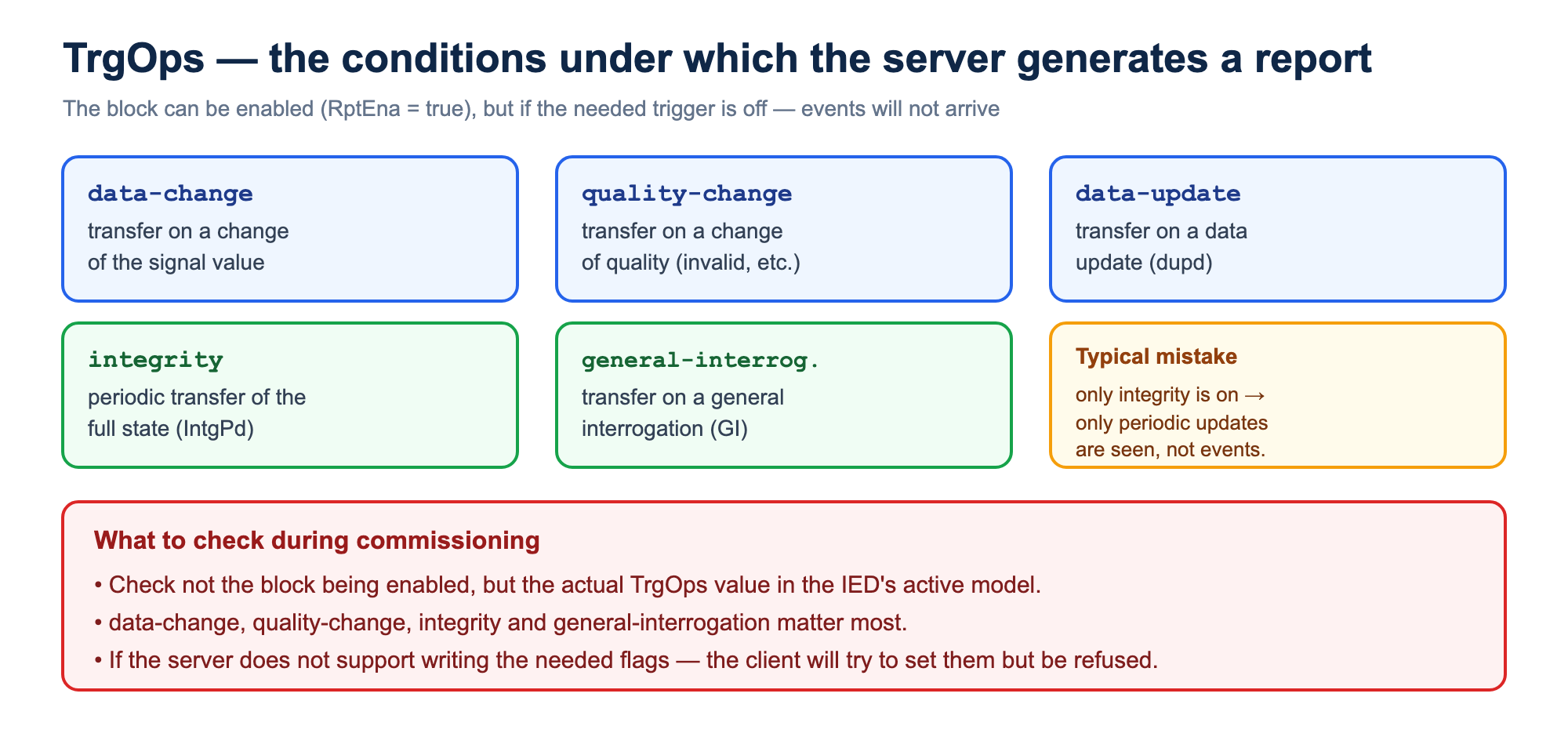
The acute practical problem is that a report can be formally enabled while the needed triggers are not activated.
For example, if only integrity is on, the client will receive periodic updates but will not see events as soon as the signals change.
If quality-change is not on, the client may not receive a data-quality change, even though for operation this is critical: the signal may stay in the same state while its quality changes to invalid, questionable, substituted or test.
If writing the needed trigger options is not supported on the client side, the client may try to set the needed flags, but the server will reject the write. As a result the report control block is enabled, but does not work the way the integrator expects.
Practical takeaway: when commissioning reports, you should check not only that the report control block is enabled, but also the actual TrgOps value in the IED's active model. It is especially important to control data-change, quality-change, integrity and general-interrogation.
The DataSet in the client does not match the DataSet in the device
A report control block does not by itself contain all the signals. It references a DataSet — the data set that should be transmitted to the client.
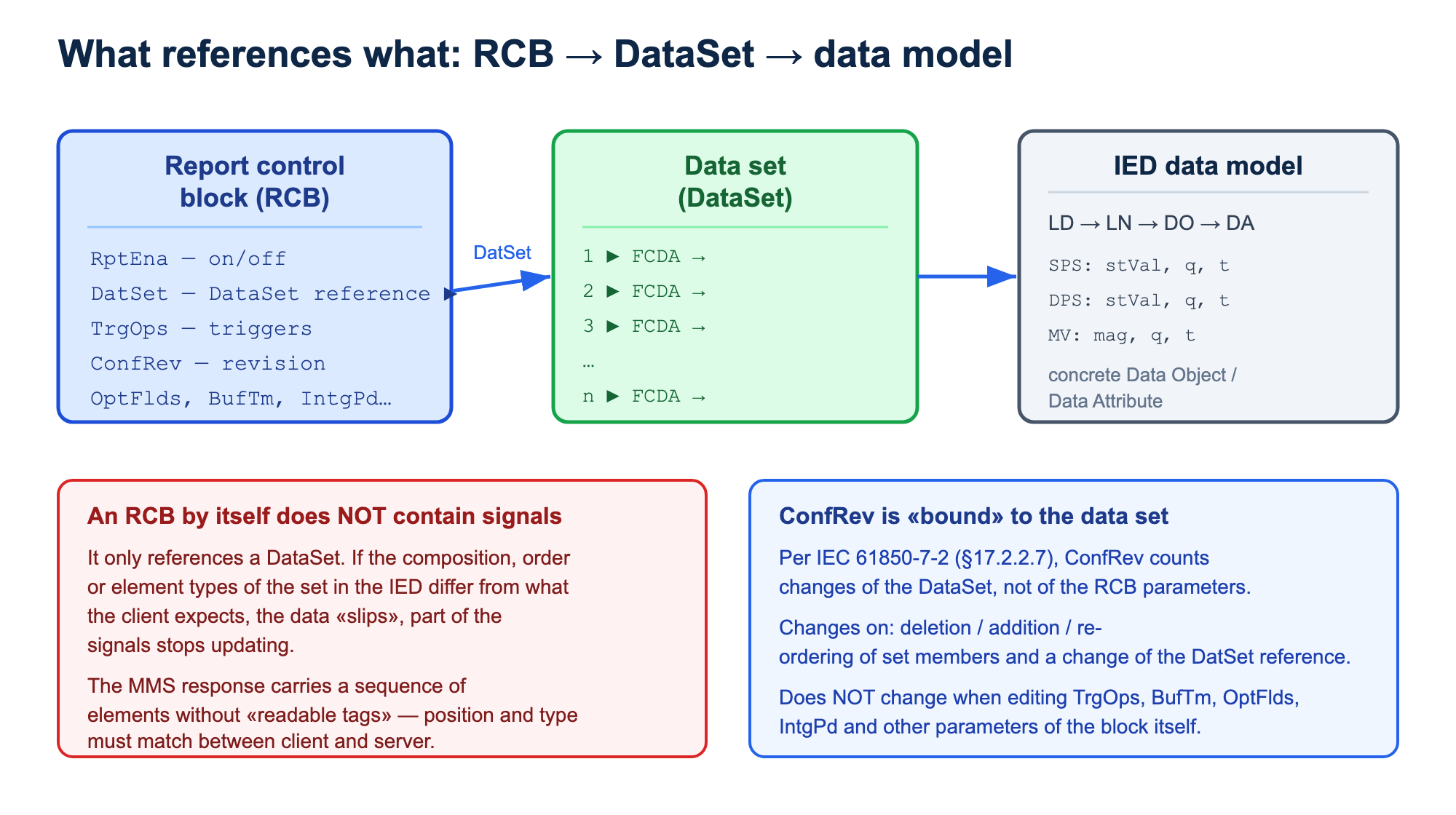
If the client and the server understand the DataSet composition differently, the nastiest problems begin: some signals update, some do not, values «slip», quality is interpreted incorrectly, and diagnostics become non-obvious.
In the MMS response the set's data is transmitted not as «named signals with readable tags», but as a sequence of elements. The client has to know in advance which element corresponds to which signal. If the DataSet composition changed in the server while the client keeps using the old description, the correspondence breaks.
And it would seem that the confRev attribute described above should protect against this problem — but what if the client does not process it?
A simple example: the client expects ten SPS signals, while in the device the second element of the data set was replaced with a DPS. Outwardly the report may keep arriving, but the client can no longer correctly parse the whole data sequence. Many clients in this situation process part of the data up to the first type mismatch, and then stop updating the remaining elements.
From an operational standpoint this is dangerous because the problem may look not like a full loss of communication but like partial degradation: «some signals update, some are frozen».
Practical takeaway: if you suspect incorrect data updates, you should compare the actual DataSet composition in the IED with the client configuration. It is important to check not only the number of elements, but also their order, data types, functional constraints and references to the specific Data Object / Data Attribute. Recall that it is precisely the changes of this set that ConfRev reflects — so a DataSet mismatch and a ConfRev mismatch usually go together.
Duplicated events from a buffered report control block
Buffered reports are used so that events are not lost during a temporary loss of the client-server link. The server buffers events, and after the connection is restored the client should receive what it missed.
But here is an important IEC 61850 detail: the server assigns each event an entryID, and the client must correctly track which entryIDs have already been processed.
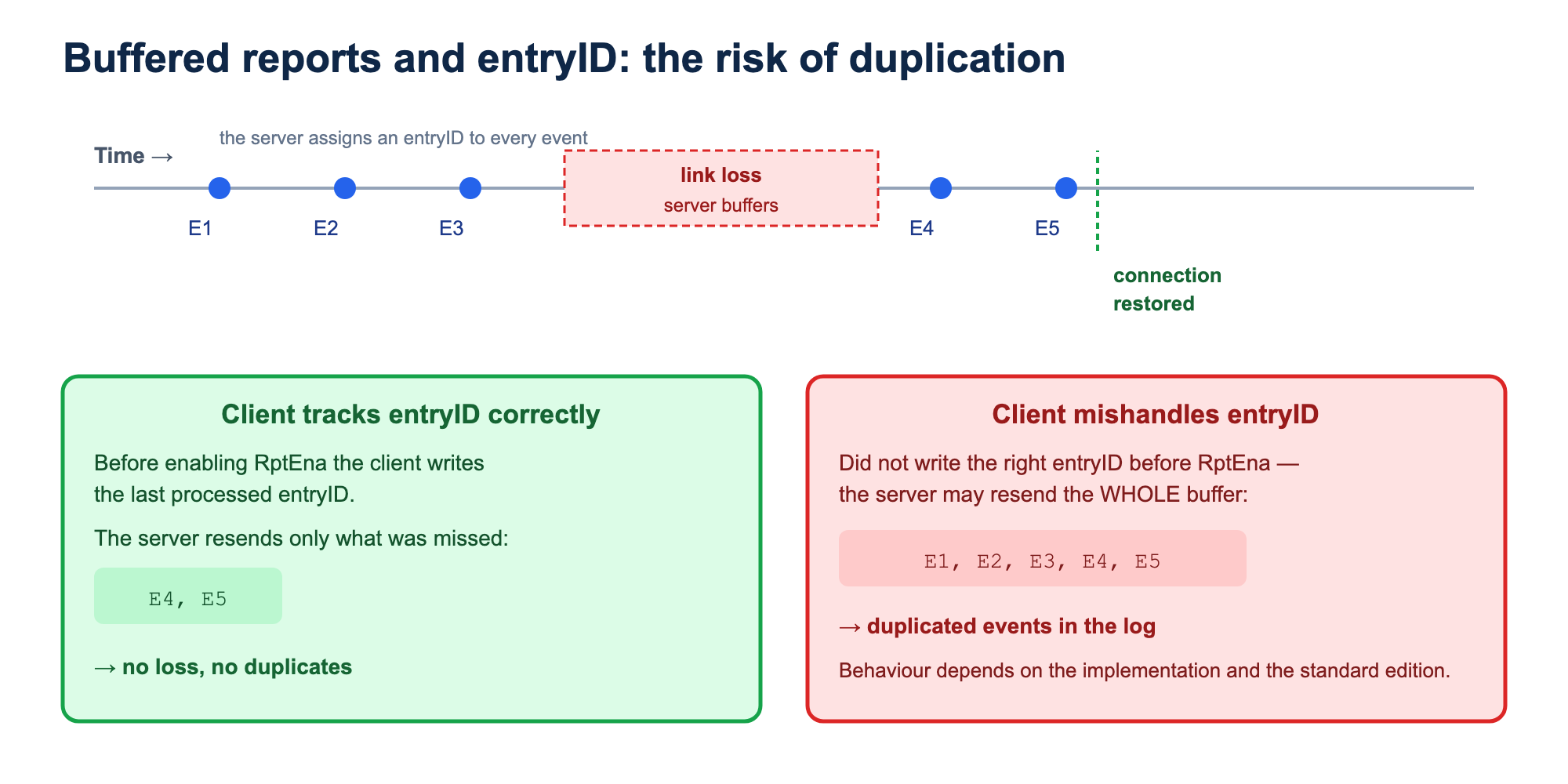
If the client handles entryID incorrectly, then on link loss, a client restart or a re-enabling of the buffered report control block it may process the same events again. In the event log this will look like duplication.
It is especially important to account for behavioural differences between implementations and editions of the standard. In some scenarios the server, on reconnection, may transmit all events from the buffer if the client did not write the right entryID before enabling RptEna.
Practical takeaway: if duplicate events appear in the system, you should analyse not only the events themselves, but also the client's behaviour when working with the buffered report control block: how it stores entryID, what it writes on reconnection, how it reacts to link loss and restart.
Too much faith in the SCL file
One of the main causes of problems with IEC 61850 reports is the certainty that the SCL/CID file on hand exactly matches what is actually loaded into the device.
In practice this is not always so. Some devices are configured not directly from a CID file but through their own engineering tools and internal settings files. Sometimes the CID is exported from the device but is not the source of its active configuration. Sometimes, after changes in the engineering software, the new configuration was not loaded into the IED. Sometimes the SCADA was configured from one file while the device runs on another.
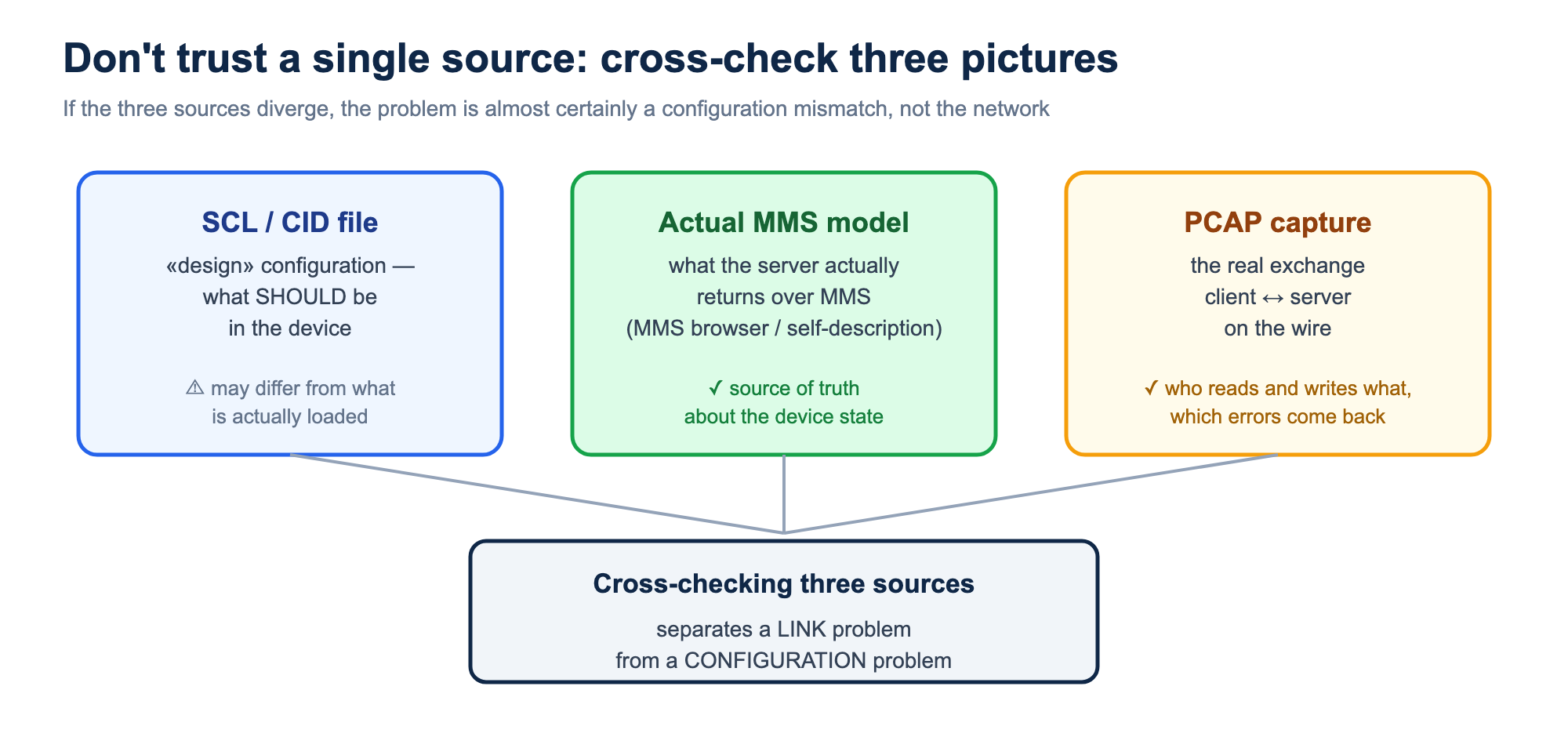
That is why, when investigating report problems, it is useful to work with three sources at once:
- the SCL/CID file considered to be the project file;
- the actual MMS model read from the device;
- a PCAP capture of the exchange between client and server.
If these three sources do not match, the problem is almost certainly a configuration mismatch. Of course, all of this can be detected automatically when using an IEC 61850 monitoring system.
What matters during implementation
Many problems with IEC 61850 reports can be prevented as early as the design and commissioning stage.
For each client you should define in advance which report control blocks it uses.
If several clients receive the same data, you should explicitly assign them different report-control-block instances rather than relying on automatic selection of a free index.
The DataSet composition must be fixed and synchronised between the IED, SCADA, HMI, gateways and monitoring systems.
After changing the DataSet composition you should track the change of ConfRev and update the client configurations. At the same time, keep in mind that editing only the block parameters (for example TrgOps or BufTm) does not change ConfRev — but the client configuration may still need to be brought into line.
For buffered reports you should separately check the scenarios of link loss, client restart and connection recovery.
Acceptance testing should include not only a «data arrives» check, but also a check of event-driven changes, quality changes, General Interrogation, integrity reports and behaviour on a connection drop.
Conclusion
IEC 61850 reports are not just «polling data over MMS». They are a mechanism of sporadic, event-driven information transfer, in which the data model, the DataSet, the triggers, buffering, configuration revisions and the client's behaviour all matter.
The sharpest problems usually arise not from a network failure, but from a mismatch between what the client expects and what is actually configured in the IED.
So the key diagnostic principle is simple: do not trust a single source of information. The SCL file, the client settings, the device's actual MMS model and a PCAP capture must be considered together.
It is exactly this approach that lets you quickly tell a network problem from a configuration one, find the cause of a non-working report and avoid situations where the MMS connection is up, but the digital substation in fact does not receive trustworthy telemetry.