In the previous articles of the series we showed how Tekvel Magic reconciles the configuration described in an SCD with the actual IED configuration and how it audits, in one click, the current state of report control blocks over MMS. Today — the third case, which closes one more task in the area of telemetry transfer: not to verify, but to document. To turn an SCL configuration of report transmission into a human-readable form — quickly, across an entire fleet of devices, and without going onto the substation network.
Why a telemetry transfer form is needed in the first place
When telemetering and telesignaling transfer over IEC 61850 is being configured — in protection IEDs, bay controllers, measurement transducers — sooner or later the moment of handover comes. The configured data model has to be passed to the engineers responsible for upper-level commissioning: SCADA, telecontrol, control centres and so on.
Ideally they receive an SCD file — under IEC 61850-6 this is a mandatory part of the design and as-built documentation, and it is exactly the SCD that simplifies integration work. In practice, however, an SCD is not always available: sometimes the only thing on hand is a set of individual CID files exported from the devices. In either case, a «bare» XML file is poorly suited for handover and review — it is hard for a human to read and inconvenient as a way of explaining which reports are configured, with what transmission parameters, and which signals they carry.
That is why the configuration is conventionally accompanied by a telemetry transfer form — a document that explains in plain language what is being transmitted and how, using MMS reports. The same document is needed at the very end of commissioning: once the secondary devices on site have been configured, as-built documentation for telemetry transfer has to be produced. Building that form by hand — copying out report control blocks, their triggers, data sets and signal contents from dozens of devices — is slow and error-prone. The module of Tekvel Magic presented here does this automatically: from an SCD file or a set of CID files it builds a ready form in a single run.
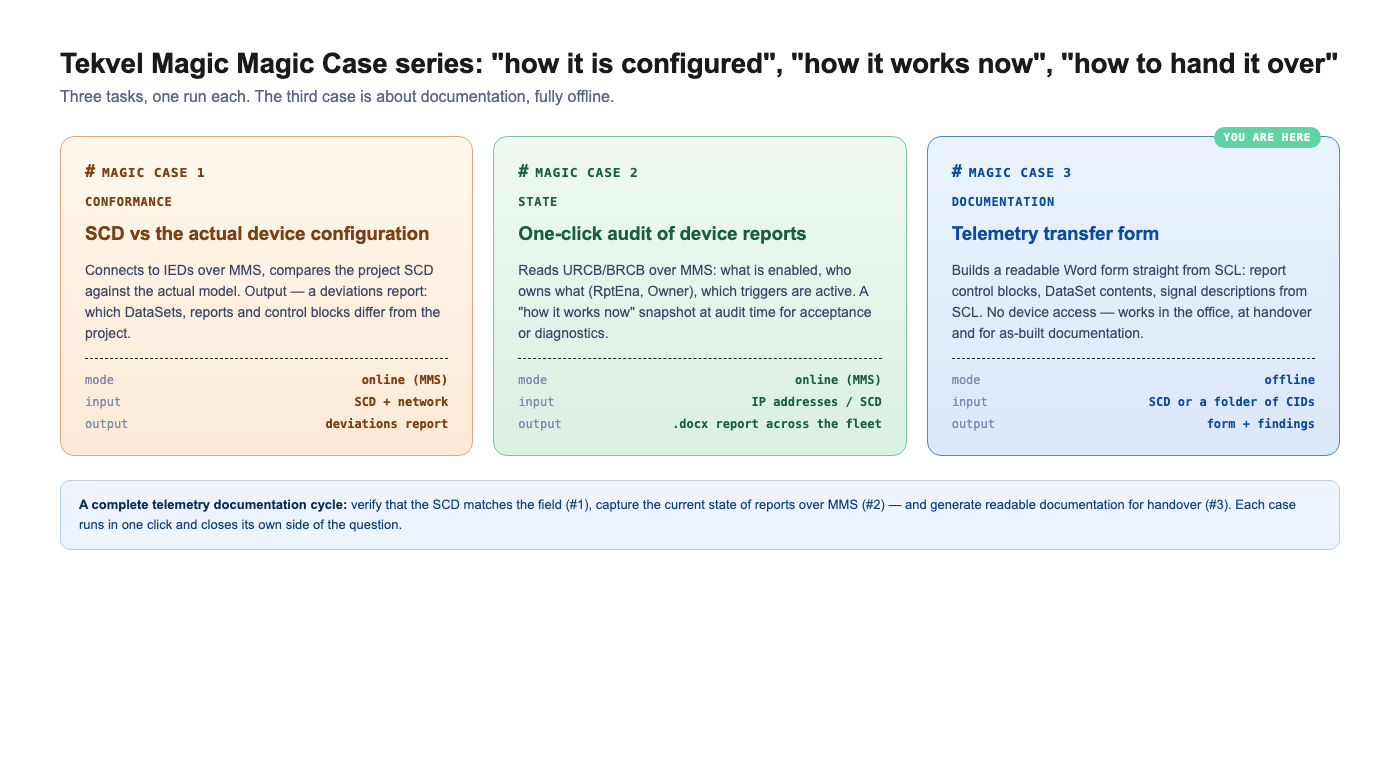
Place in the series: «how it is configured», «how it works right now», «how to hand it over»
To avoid mixing up three closely related tasks, it helps to keep this split in mind:
- Case #1 — conformance: reconciles the design SCD with the actual device configuration over MMS and produces a deviation report.
- Case #2 — state: connects to the devices over MMS and shows how the reports are working right now (RptEna, Owner, who is subscribed to what).
- Case #3 — documentation (this one): takes the SCL configuration and turns it into a readable form and as-built documentation. There are no «match / mismatch» verdicts and no network access — only an accurate, human-readable description of how report transmission is configured.
The key feature of the third case — it runs fully offline. No access to the substation network is needed, no live devices: the files are enough. That is convenient in the office, while preparing documentation, when a project is being handed over between contractors, and when the as-built package is being assembled for delivery.
How it works
The scenario is as short as it gets. You launch the module — and in the first dialog you choose the data source:
- a single SCL file (an SCD with several devices, or a stand-alone CID/ICD), or
- a folder of CID files (
.cid/.iid/.icd/.scd/.scl) — each file is read separately and the devices from all the files are merged into a single common form.
Next you are offered to choose the devices to build the document for (there is a «select all» item — handy when the SCD contains several dozen of them). The module finds, in every selected device, all report control blocks — buffered (BRCB) and unbuffered (URCB) — expands the data sets they reference, picks up the textual signal descriptions from the SCL and assembles a Word document. In parallel, a separate document with configuration findings is produced (more on that below).
The whole algorithm is easier to follow as a flow chart — from picking the source to the ready documents:
flowchart TB
    A["Launch the module"]
    B{"Data source?"}
    F["One SCL file<br/><i>SCD / CID / ICD</i>"]
    G["Folder of CID files<br/><i>.cid/.iid/.icd/.scd/</i>"]
    C["List of IEDs<br/><i>device names and desc</i>"]
    S["Select devices<br/><i>'select all' available</i>"]

    A --> B
    B -->|file| F --> C
    B -->|folder| G --> C
    C --> S --> LOOP

    subgraph LOOP["For each selected IED"]
        direction TB
        R["Find URCB / BRCB blocks"]
        D["Expand data sets (DataSet)<br/><i>FCDA → LD / LN / DO / DA / FC</i>"]
        T["Extract signal descriptions<br/><i>desc from SCL: DAI → DOI → LN</i>"]
        R --> D --> T
    end

    LOOP ==> DOC["<b>FORM (.docx)</b><br/>per-device overview •<br/>summary table of blocks •<br/>detail per block"]
    LOOP --> CHK["<b>CONFIGURATION FINDINGS (.docx)</b><br/>data sets, triggers/period,<br/>IP, threshold recommendations"]
    DOC --> SAVE["Save documents to disk"]
    CHK --> SAVE

    style A fill:#F3F3F3,stroke:#888
    style B fill:#EDE7F6,stroke:#7E57C2,color:#311B92
    style F fill:#E0F2F1,stroke:#26A69A,color:#004D40
    style G fill:#E0F2F1,stroke:#26A69A,color:#004D40
    style C fill:#F3F3F3,stroke:#888
    style S fill:#EDE7F6,stroke:#7E57C2,color:#311B92
    style R fill:#E3F2FD,stroke:#42A5F5,color:#0D47A1
    style D fill:#E3F2FD,stroke:#42A5F5,color:#0D47A1
    style T fill:#E3F2FD,stroke:#42A5F5,color:#0D47A1
    style DOC fill:#E8F5E9,stroke:#43A047,color:#1B5E20
    style CHK fill:#FFF8E1,stroke:#F9A825,color:#E65100
    style SAVE fill:#FAFAFA,stroke:#AAA
What is inside the form
The document is generated with an automatically built table of contents (the field refreshes when the file is opened in Word). The structure is laid out so that the commissioning engineer, the upper-level integrator and the customer (running acceptance) can all work with it equally comfortably.
Per-device overview summary table
If the source contains several IEDs, the document opens with a top-level view: one row per device — name (as a hyperlink to the corresponding section), description, IP address, the number of URCBs and BRCBs, total blocks and data objects, plus a totals row. This is a «map» of the whole package: you immediately see how many reports of each type are configured across the substation, how many signals in total are passed to the upper level, and so on.
Per-device section
Inside — three levels of detail:
- Device parameters: name, description (from the
descattribute of the IED element) and a table of all access points with their network parameters (access point / subnet / IP / mask / gateway). - Summary table of control blocks: one row per block — access point, MMS reference to the block, type (B/UB), number of exposed instances, active triggers (TrgOps) and optional fields (OptFlds), reference to the data set, number of data objects, buffer time (BufTm) and integrity period (IntgPd). Problem spots are highlighted right here: blocks with no data set assigned are flagged.
- Detailed information per block: separate sub-sections — main attributes, triggers (with the TrgOps bit string), optional fields (with the OptFlds bit string), timing parameters with explanations, and finally the element-by-element data set, broken down by LD / LN / DO / DA / FC columns.
A separate word about indexed blocks. Under IEC 61850-6, a single control block can be exposed as several independent instances (name01 … nameNN, where the count is set by the RptEnabled max attribute). The form takes that into account: for every block the actual number of exposed instances and their names are shown — exactly what an upper-level client will be dealing with.
And — most valuable for readability — signal descriptions in the project's own language. For each element of the data set, the textual description is picked up from the SCL (the desc attribute). Instead of an abstract «MMXU1.A.phsA», the document shows the human-readable explanation from the project — and the meaning of every report falls into place in seconds, with no need to open a data-model browser. The descriptions are taken from the SCL strictly «as-is»: no translation, no external dictionaries, so that the document exactly reflects what is in the configuration.
Configuration findings — a separate document
In addition to the form, the module produces a separate Configuration findings document. This is a lightweight offline audit: data sets are checked (not assigned / not found in the expected logical node / empty), triggers and reporting parameters are checked for consistency, the communication parameters are checked (no IP for an access point that carries control blocks, duplicate IPs across devices), plus threshold recommendations (BufTm too large, IntgPd too small). Every finding has a level — error, warning or recommendation — and lands in a summary table with colour highlighting. A handy way to catch typical mistakes already at the documentation-preparation stage, before handover.
What this is good for in practice
The main value is speed and readability at the handover stage. You are passing the project to a SCADA integrator or to the customer — and together with the SCD/CID you hand over a readable form, from which it is immediately clear which reports are configured, what they carry and how they are addressed. You are wrapping up commissioning — with the same module of Tekvel Magic you get the as-built documentation for telemetry transfer, neat and uniform across the whole fleet of devices. And because the module works offline, it is equally useful in the office while preparing the package, on site, and when an object is being handed over between contractors — wherever live access to the devices may not be available.
In combination with cases #1 and #2 this gives the full cycle: verify the SCD against the facts, capture the current state of reports over MMS — and produce readable documentation for handover. «How it is configured», «how it works right now» and «how to explain it to others» — three tasks, each in a single run.
Enjoy using it! And remember, IEC 61850 engineering sometimes calls for a little Magic :)